Design Call Flows Visually with PBX Studio's Drag-and-Drop Builder
Managing call routing across scattered menus makes it hard to see the full picture. PBX Studio's call flow builder gives admins a drag-and-drop visual canvas to design, connect, and publish complete call flows in one place, from phone numbers to queues, ring groups, auto attendants, business hours, and announcements.
New admins get up to speed faster, and misconfigurations are easy to spot visually before they cause issues.


What Is PBX Studio Call Flow Builder?
PBX Studio is PBX.IM's visual call flow builder for administrators, supervisors, and call routing managers. Instead of jumping between separate menus, admins get a single drag-and-drop canvas to add, connect, and publish complete call flows in one place.
Phone numbers, extensions, ring groups, queues, auto attendants, call forwarding, announcements, and business hours conditions are all supported.
Each node opens an inline configuration panel with real-time visual connections showing exactly where a call goes at every step, making setup faster, onboarding easier, and misconfigurations easier to catch before they go live.
How Does Call Flow Builder Work?
PBX Studio gives admins a node-based visual canvas to design and publish complete inbound call flows without navigating multiple menus. Every routing component can be added, configured, and connected in one place.

Visual Canvas
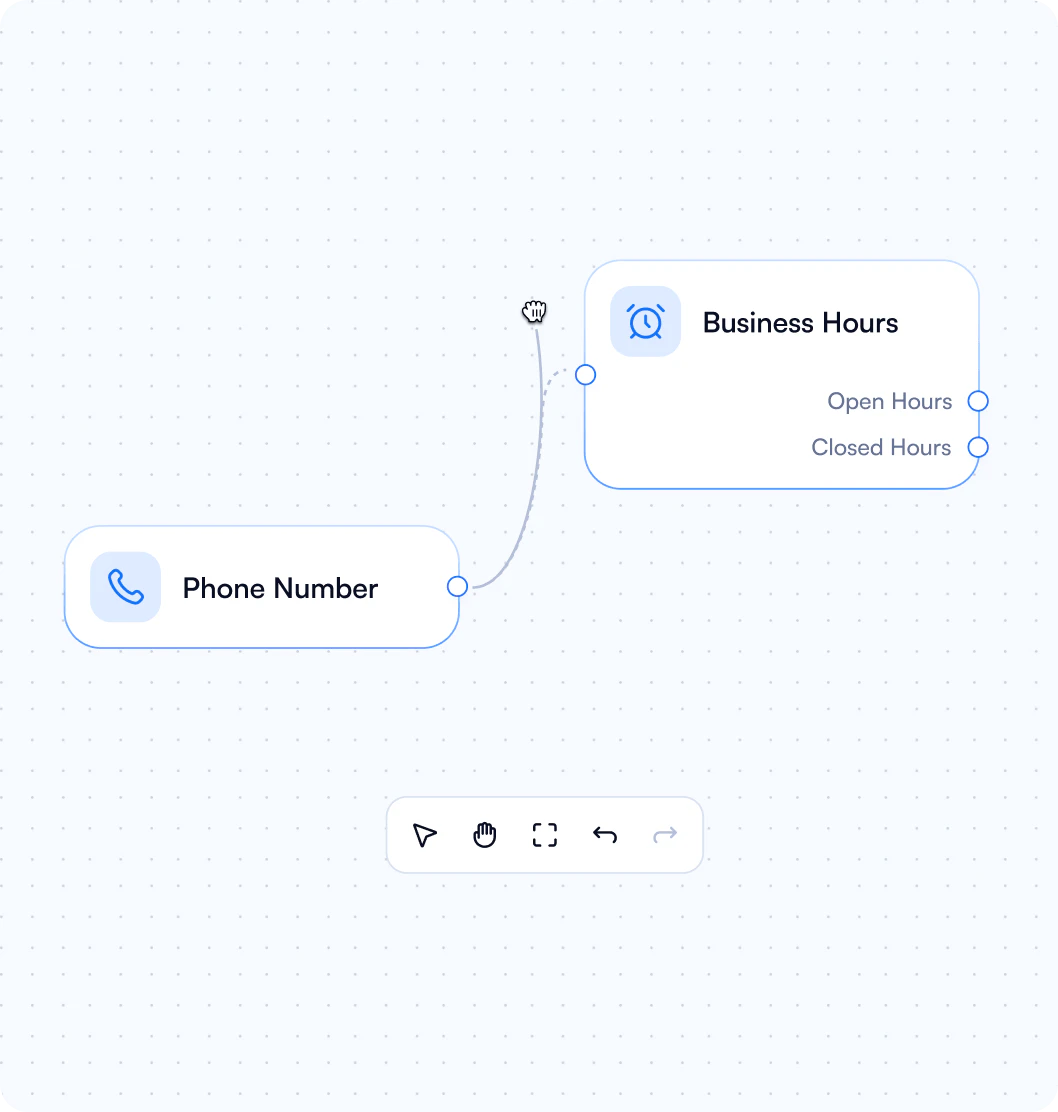
PBX Studio opens a drag-and-drop call flow designer where every call routing component appears as a connected node. Admins can zoom, pan, undo, redo, and select multiple nodes at once, keeping even complex call flows easy to navigate and edit.

Node Configuration
Each node represents a routing object, including phone numbers, extensions, ring groups, queues, auto attendants, call forwarding, announcements, and business hours conditions. Clicking any node opens an inline configuration panel, so admins can create or edit objects directly on the canvas without leaving the flow.

Real-Time Visual Connections
As nodes are linked, PBX Studio renders live visual connections showing the exact path a call takes at every step. Call flow editor makes easy to audit routing logic, catch misconfigurations before they go live, and onboard new admins without a steep learning curve.
Easily Design Call Flow Diagram with Plug-and Play Builder
Designing a call flow diagram in PBX Studio is as simple as dragging, dropping, and connecting nodes on a canvas. No coding, no multi-page navigation, just a clear visual map of how every call moves through your system.
See the Full Call Diagram
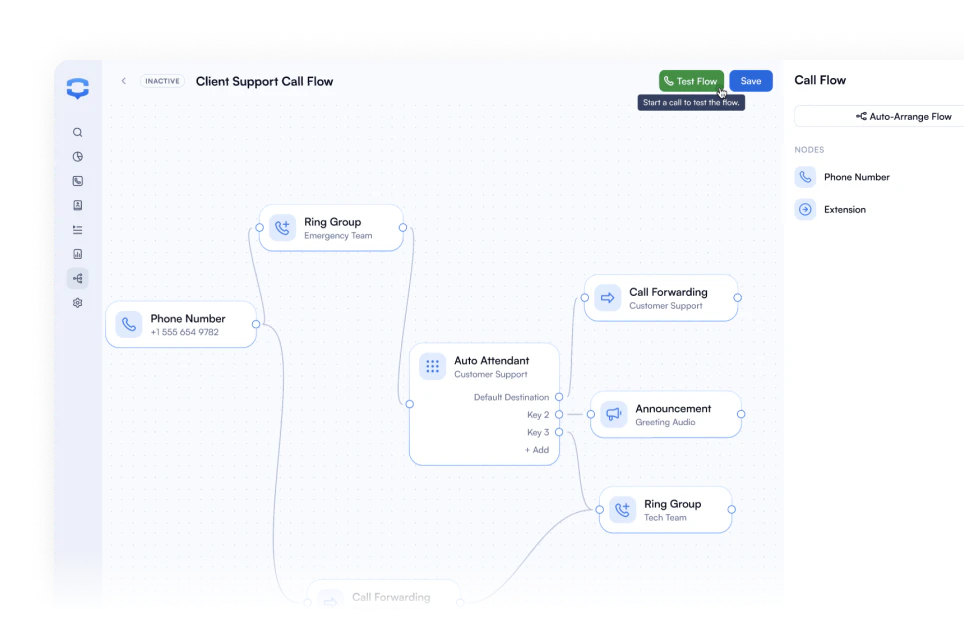
PBX Studio displays every routing component and connection on a single canvas, giving admins a complete picture of how calls move through the system. No more switching between menus to piece together where a call ends up.
Drag, Drop, and Connect in Seconds
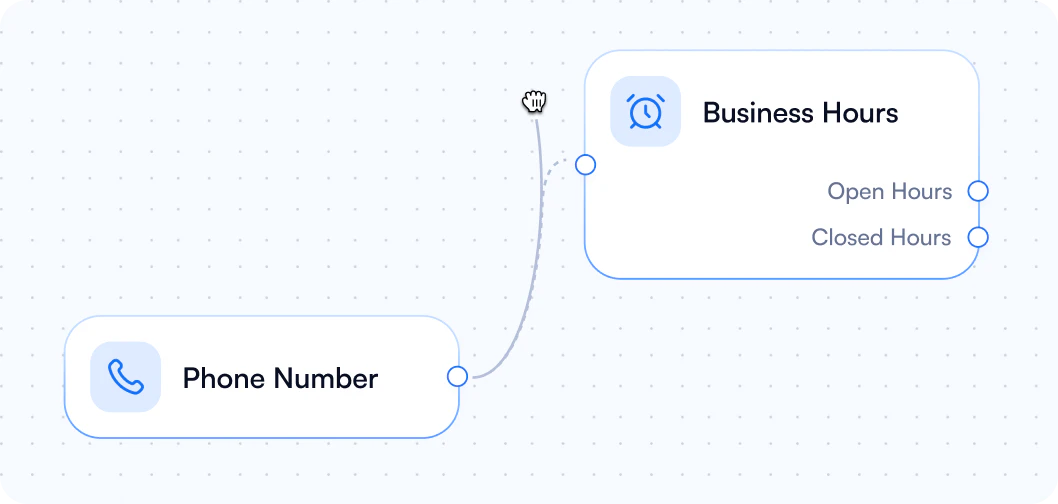
Building a call flow in PBX Studio feels like working in a modern design tool, not a legacy enterprise dashboard. Drag nodes onto the canvas, connect them in the order calls will follow, and publish without touching a single form or nested menu.
All Routing Components in One Canvas
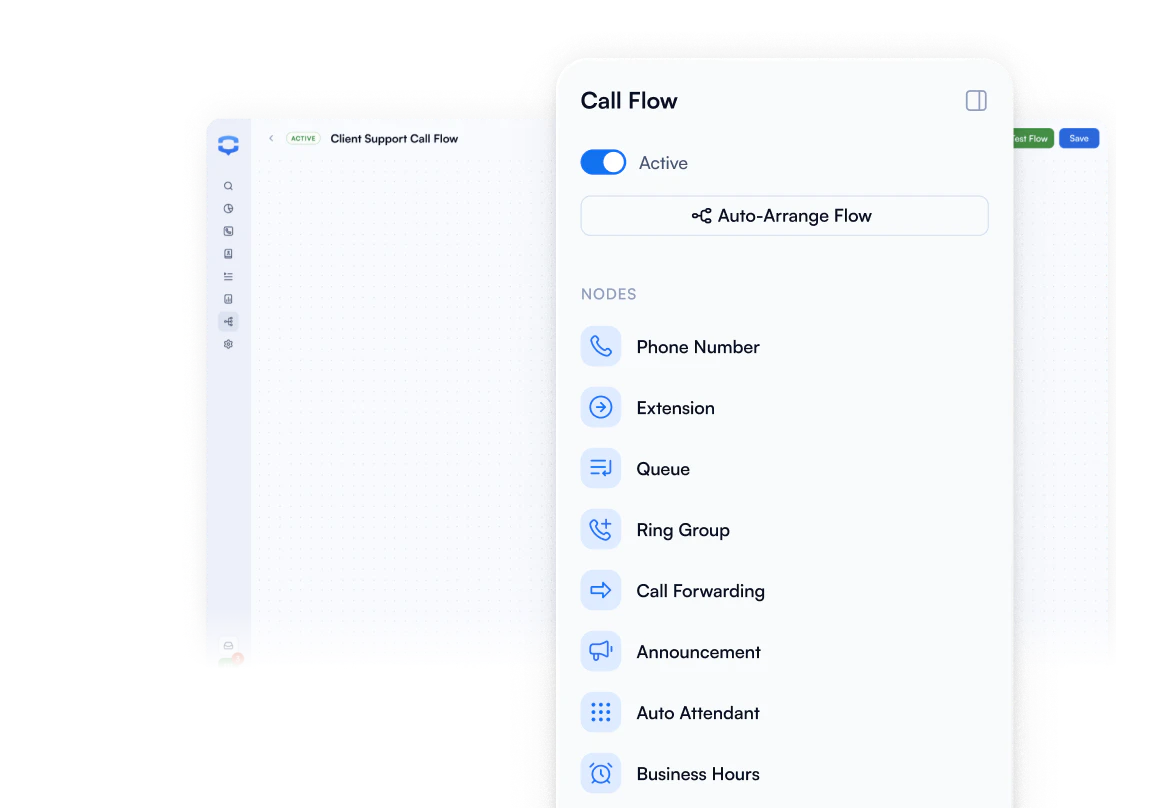
Phone numbers, extensions, ring groups, queues, auto attendants, call forwarding, announcements, and business hours conditions are all available as nodes inside PBX Studio. Every component your call flow needs lives in one place, ready to configure inline without leaving the canvas.


Stop jumping between menus. PBX Studio gives your team a drag-and-drop call flow tool to design and manage inbound call routing in one place.
The IVR Call Flow Design Tool Built for Speed


Phone Number
Assign inbound numbers as entry points to any call flow. Every number appears as a node on the canvas, so you can see exactly where it routes at a glance.

Extension
Route calls to specific users or devices directly from the canvas. Configure ring time, voicemail fallback, and caller ID inline without leaving the flow.

Ring Group
Ring multiple team members simultaneously or in sequence and connect it to any point in your call flow. The first available person picks up, so no call goes unanswered.

Queue
Place callers in a managed waiting line with hold music and position announcements until an agent is free. Connect queues to any step in your flow and configure them inline.

Auto Attendant
Build multi-level IVR menus with branching paths, all visible on the canvas. Press 1 for Sales, Press 2 for Support, and every option maps out exactly where calls go next.

Business Hours
Set time-based routing conditions so calls reach the right destination during office hours, after hours, and on holidays.
PBX Studio vs. Traditional PBX Configuration
| Traditional PBX Configuration | PBX Studio Call Flow Builder | |
|---|---|---|
| Call Flow Visibility | Jump between multiple menus to configure a single route. | Build your entire call flow on one visual canvas. |
| Setup Speed | Navigate nested pages just to set up one route. | Drag, drop, and connect nodes to go live in minutes. |
| Editing Experience | Find the right page, fill a form, save, go back, repeat. | Click any node and edit inline, no page-switching needed. |
| Debugging | Click through screens guessing where the call broke. | Spot broken connections and misconfigs before they go live. |
| Learning Curve | New admins need days to learn the menu structure | Intuitive interface, new admins get productive in one session. |
| Component Management | IVRs, queues, ring groups, and rules live in separate sections. | All routing components in one canvas, managed together. |
Read What Our Clients Say About Us!
“One of the things I appreciate most is how easy it is to self-manage. I was able to set up everything myself without needing to hire any outside help, which saved us both time and money. It’s helped us close deals faster and provide better service, which our customers really appreciate.”

“It’s been a great experience and a smart investment. It’s helped us close deals faster and provide better service, which our customers really appreciate. If you’re running a growing business and want more control over your communications, I highly recommend this system!”

“What really sets them apart is their top notch support. The team clearly knows VoIP inside and out, and every interaction we’ve had has been fast, professional, and incredibly helpful. It’s rare to find a provider that combines excellent tech with equally excellent service.”
Call Flow Builder FAQs
What are the benefits of PBX Studio call flows?
What are the benefits of PBX Studio call flows?
PBX Studio's call flow builder gives admins a single visual canvas to design, manage, and publish complete inbound call routing. Key benefits include faster setup, a lower learning curve for new admins, real-time visual connections between routing components, and the ability to spot and fix misconfigurations before they affect live calls.
Are PBX Studio call flows only meant for call centers?
Are PBX Studio call flows only meant for call centers?
No. While call centers benefit greatly from visual call flow design, PBX Studio is built for any business that handles inbound calls, including multi-location companies, professional services firms, and growing teams that need structured, reliable call routing without dedicated IT support.
What is the best call flow software?
What is the best call flow software?
The best call flow software gives non-technical users the ability to design and manage routing without relying on forms or nested menus. PBX Studio's node-based visual call flow builder covers every major routing component, including phone numbers, extensions, ring groups, queues, auto attendants, and business hours conditions, all configurable from a single drag-and-drop canvas.
Who is PBX Studio Call Flow Builder designer for?
Who is PBX Studio Call Flow Builder designer for?
PBX Studio is designed for administrators, supervisors, and call routing managers who need to build and manage inbound call routing without technical expertise. It is especially useful for teams onboarding new admins or managing complex routing setups across multiple departments or locations.
Can I edit an existing call flow in PBX Studio?
Can I edit an existing call flow in PBX Studio?
Yes. PBX Studio allows you to open, edit, duplicate, and republish any existing call flow directly on the canvas. Changes to individual nodes are made inline, so you can update routing logic without rebuilding the entire flow from scratch.
Do I need technical skills to use a call flow tool?
Do I need technical skills to use a call flow tool?
No. PBX Studio's call flow builder is designed for non-technical users. The drag-and-drop canvas, inline node configuration, and real-time visual connections make it straightforward to build and manage call flows without coding or specialized PBX knowledge.