
One Inbox for Every WhatsApp Call and Conversation
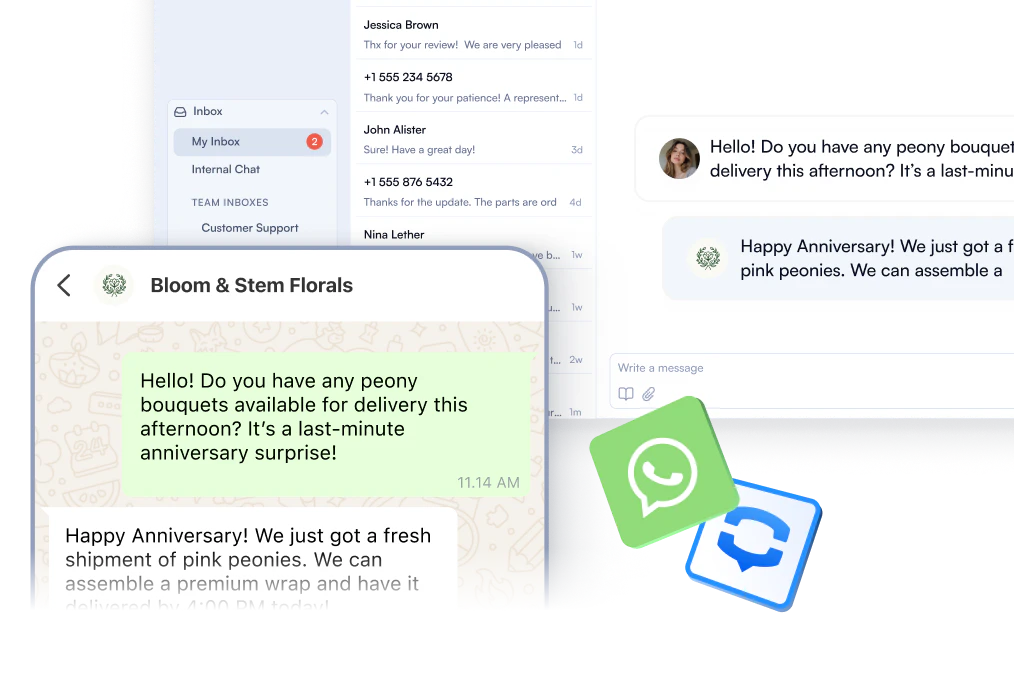
Every WhatsApp conversation, fully visible to your team. Assign chats to the right agent, track the full history, and eliminate shared credentials for good. One dashboard handles it all.
Keep the Conversation Going
No matter the channel, your team stays in sync. Switch seamlessly between WhatsApp texting and voice calls without losing context, so customers get a consistent experience from first message to final resolution. PBX.IM's integrated business text messaging and calling capabilities connect every touchpoint in one place.
Integrate Your CRM and Tools Into One Workflow
Your agents shouldn't be switching between five tabs to answer one question. PBX.IM connects with HubSpot, Salesforce, Zendesk, and more, syncing conversation history, contact details, and customer interactions automatically so your team always has the full picture.

Handle Calls, Messages, and Attachments Without Leaving Your Dashboard
Everything your team needs is in one place. Take calls, reply to WhatsApp messages, and manage attachments from a single dashboard without opening another tab or switching tools mid-conversation.

Make Smarter Decisions Using Analytics Reports
Stop guessing how your team is performing. PBX.IM's analytics dashboards give you a real-time view of message volume, response times, and agent productivity so you can spot bottlenecks before they affect your customers.

Shared Inbox for Your Whole Team
One WhatsApp number, managed by everyone who needs it. Multiple agents can view, respond to, and manage incoming conversations from a single business number with PBX.IM. No shared passwords, no missed messages, no duplicate replies. Assign conversations to the right team member, add internal notes for context, and track every interaction from first contact to resolution.


How does WhatsApp Team Inbox improve communication?
A shared WhatsApp inbox transforms scattered one-on-one conversations into organized, collaborative team communication that scales with your business.

Instant Team Messaging
Chat with teammates directly inside PBX.IM. Coordinate instantly without switching tools.

Group Chats for Collaboration
Create shared chats for departments or projects to keep updates and discussions centralized.

Support While on Calls
Ask for help or share quick context while speaking with a client, without leaving the call screen.

Stay Organized & Informed
All internal messages, mentions, and updates stay searchable and secure within one system.
How to Set up a Shared WhatsApp Inbox with PBX.IM?
Three steps to give your whole team access to a single, organized WhatsApp inbox.
Create Your PBX.IM Account

Connect Your WhatsApp Business

Set Up Your Shared Inbox

Read What Our Clients Say About Us!
“One of the things I appreciate most is how easy it is to self-manage. I was able to set up everything myself without needing to hire any outside help, which saved us both time and money. It’s helped us close deals faster and provide better service, which our customers really appreciate.”

“It’s been a great experience and a smart investment. It’s helped us close deals faster and provide better service, which our customers really appreciate. If you’re running a growing business and want more control over your communications, I highly recommend this system!”

“What really sets them apart is their top notch support. The team clearly knows VoIP inside and out, and every interaction we’ve had has been fast, professional, and incredibly helpful. It’s rare to find a provider that combines excellent tech with equally excellent service.”
Why Teams Choose PBX.IM Over Other Call Barging Software
PBX.im delivers enterprise-grade functionalities with the simplicity and speed that modern teams expect.


End-to-End Encryption
Every WhatsApp conversation on PBX.IM is protected by end-to-end encryption, meaning only your team and your customer can read what's shared.

Set Roles and Permissions
Control exactly who on your team can access, respond to, or manage conversations. Assign roles so sensitive customer data only reaches the right people.

Don’t Risk Data Leaks
PBX.IM keeps all customer conversations inside a controlled, auditable workspace your team manages centrally.
Connect WhatsApp Shared Inbox with Any CRM
Sync conversations, contacts, and history with the tools you already use.
 Salesforce
 Hubspot
 Zoho
Zoho Microsoft Dynamics
 Pipedrive
 monday.com
 SAP CRM
 Oracle CRM
 Oracle Siebel
 Zendesk Sell
 Freshsales
 SugarCRM
 Insightly
 Copper
 Close.io
 Nimble
 Pipeliner
 Creatio
 Pegasystems
 amoCRM
WhatsApp Business Messaging FAQs
What is a WhatsApp business messaging inbox?
What is a WhatsApp business messaging inbox?
A WhatsApp business messaging inbox is a shared workspace that lets your entire team send, receive, and manage WhatsApp conversations from one centralized dashboard. Unlike a personal WhatsApp account, it gives multiple agents simultaneous access without sharing a phone or credentials.
What’s the difference between a WhatsApp Team Inbox and a regular WhatsApp inbox?
What’s the difference between a WhatsApp Team Inbox and a regular WhatsApp inbox?
A regular WhatsApp inbox is tied to one phone and one person. A team inbox like PBX.IM’s lets multiple agents handle conversations simultaneously, with routing rules, role-based permissions, conversation history, and CRM sync built in. Built for teams, not individuals.
Is customer data secure in a WhatsApp shared inbox?
Is customer data secure in a WhatsApp shared inbox?
Yes. Every conversation is end-to-end encrypted and handled within a controlled, auditable workspace. Agents access conversations through role-based permissions, so sensitive customer data never ends up on personal devices or unsecured channels.
Can multiple agents reply to the same conversation?
Can multiple agents reply to the same conversation?
Multiple agents can view all conversations from the shared inbox, but to avoid duplicated or conflicting replies, conversations are routed and assigned to a specific agent. Your team stays coordinated without stepping on each other. Users can be reassigned if required.
Can I send and receive WhatsApp calls and messages internationally with PBX.IM numbers?
Can I send and receive WhatsApp calls and messages internationally with PBX.IM numbers?
Yes. PBX.IM numbers can be linked to WhatsApp and used across all countries that Meta supports.
Is it suitable for sales and support teams?
Is it suitable for sales and support teams?
Absolutely. Support teams use it to manage high volumes of customer conversations without missing a message. Sales teams use it to follow up with leads, share attachments, and keep every interaction logged directly in their CRM.
Does the inbox support images, videos, and voice messages?
Does the inbox support images, videos, and voice messages?
Yes. PBX.IM supports sending and receiving attachments including images, documents, and voice messages through the shared inbox, for both their business and personal WhatsApp accounts.
Can I track WhatsApp conversations directly in my CRM?
Can I track WhatsApp conversations directly in my CRM?
Yes. PBX.IM integrates with HubSpot, Salesforce, Zendesk, and any CRM your team uses, syncing conversation history, contact details, and customer interactions automatically so everything is logged without manual input.
Which WhatsApp messaging service is best for businesses?
Which WhatsApp messaging service is best for businesses?
The right solution depends on your team size and needs. PBX.IM is built for either personal use or teams that need a shared inbox, CRM integration, and voice plus messaging in one platform, without the complexity or cost of developer-heavy alternatives like Twilio.