Unified communication platforms like PBX.IM enable seamless computer-to-phone calling through your web browser, eliminating the need for physical phone hardware while providing enterprise-grade features that traditional systems can't match.
Running a business today means juggling multiple communication channels and remote teams across time zones. You’re dealing with rising phone costs, dropped calls, and scattered customer interactions. When reps work from home without the office phone system or your support team needs affordable international calling, traditional phone systems just can’t keep up.
The shift to remote and hybrid work has fundamentally changed how businesses communicate. According to McKinsey, 58% of Americans have the opportunity to work from home at least one day per week, creating an urgent need for reliable, cost-effective calling solutions that work from anywhere. Meanwhile, businesses waste an average of $1,200 per employee annually on inefficient communication tools that don't integrate with their existing workflows.
Systems that let you call a phone from a computer deliver measurable ROI through reduced infrastructure costs (up to 60% savings compared to traditional PBX systems), improved productivity (employees save 20-30 minutes daily by eliminating phone tag), and better customer experiences through integrated communication data.
TL;DR
- Modern businesses can call phone from computer using VoIP platforms like PBX.IM, eliminating expensive hardware and enabling remote teams to maintain professional communication from anywhere with internet access.
- Computer phone solutions deliver 40-60% cost savings compared to traditional phone systems while providing advanced features like call recording, analytics, CRM integration, and AI transcriptions that improve operational efficiency.
- Implementation is straightforward—you can start making calls from your browser in minutes using features like Click2Call and Contact Us Web Widget, with plans starting at just $5 to test fit before scaling.
Why Businesses Need Computer-to-Phone Calling Solutions
The traditional desk phone model costs businesses far more than the monthly service fees suggest. When you factor in hardware installation ($200-$500 per phone), maintenance contracts (15-20% of initial investment annually), and PBX infrastructure ($10,000-$50,000 for on-premises systems), companies with 50 employees can easily spend $30,000-$75,000 just to set up basic phone service. Computer-based calling eliminates these capital expenses entirely—you're paying for software subscriptions rather than maintaining physical infrastructure.
PBX.IM Tips: Basic tools like Google Voice, Skype, or WhatsApp can handle simple computer-to-phone calls, but they lack the advanced features businesses need as they grow. As teams scale, platforms with call queues, analytics, compliance tools, and integrations significantly improve operations.
Remote and hybrid teams operate seamlessly.
Employees can make and receive calls from any computer, anywhere—office, home, or abroad. There’s no device forwarding, no juggling personal numbers, and no missed calls. Everyone stays reachable through one unified business number.
Scalability becomes instant and effortless.
Adding new team members takes minutes instead of weeks. There’s no hardware to buy, no installation delays, and no system reconfiguration. Whether your team jumps from 10 to 100 people, the communication system scales with zero friction.
Integration with business tools improves productivity.
When your phone system connects with your CRM or helpdesk, reps can click-to-call, access customer history instantly, and manage interactions without switching screens. Managers gain real-time dashboards to monitor call volume, wait times, and team performance.
Analytics and call tracking unlock operational insights.
You can see which campaigns drive calls, why calls get transferred, customer wait times, and which agents need coaching. This data helps optimize staffing, improve customer experience, and prove ROI on communication tools.
Professional features elevate everyday communication.
Call recording supports quality control and training. Warm transfers create smoother customer handoffs. Conference calling connects distributed teams and clients. Voicemail transcription saves time by turning messages into text.
Compliance and security keep customer trust intact.
Enterprise VoIP platforms offer SOC 2 Type II compliance, encrypted calls, audit logs, and controls required for industries like finance, healthcare, and legal. These aren’t nice-to-haves—they’re essential for avoiding risks and meeting regulatory standards.
Pro Tip: Test PBX.IM with the $5 starter plan or free plan to make sure it fits your workflow. Check call quality, explore integrations, and confirm the feature set supports your team before scaling across the organization.
How to Make a Phone Call from a Computer with PBX.IM
PBX.IM offers multiple pathways to call someone from a computer, each designed for different workflow scenarios. The browser-based softphone is your primary calling interface—log into the web dashboard, and you'll see a dial pad where you can directly enter any phone number and click to call. No downloads, no installations, no complexity. Your entire phone system lives in a browser tab alongside your other business applications.
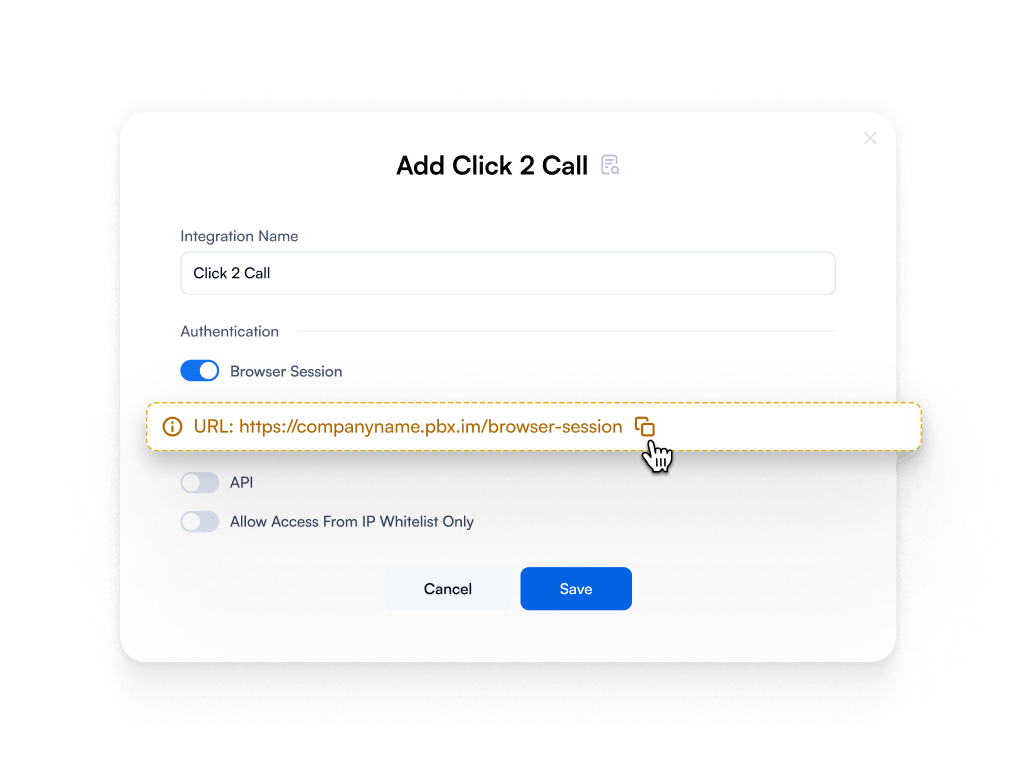
The Click2Call feature integrates directly into your existing workflows. When you're viewing customer records in your CRM or reading support tickets in your helpdesk software, Click2Call transforms phone numbers into callable links. One click initiates the call through your computer without manually dialing. This seemingly small convenience saves hours monthly while reducing dialing errors that frustrate customers and waste time.

.
Beyond voice calls, PBX.IM turns your computer into a complete communication hub. Send SMS messages directly from the platform to follow up after calls, confirm appointments, or provide tracking information. Customers increasingly prefer text communication for non-urgent matters, and handling everything from one interface keeps your team organized and responsive.
AI transcription capabilities transform how you capture and utilize call information. Every conversation gets automatically transcribed and attached to customer records, eliminating manual note-taking during calls. Your team can focus entirely on the customer conversation, knowing they'll have searchable, accurate transcripts for reference later. These transcriptions power better follow-up, training opportunities, and compliance documentation.
Mobile and desktop apps extend your computer calling capabilities across devices. Start a call on your laptop, then seamlessly transfer it to your mobile app when you need to step away from your desk. The experience remains consistent regardless of which device you're using, and customers interact with the same business phone number throughout.
Call forwarding and routing rules ensure you never miss important calls even when you're away from your computer. Configure rules that forward calls to your mobile phone after hours, route specific customers to designated team members, or implement time-based routing that adapts to your business schedule. Your computer becomes the central control point for managing how all business calls get handled.
How Customers Can Call You from a Computer with PBX.IM
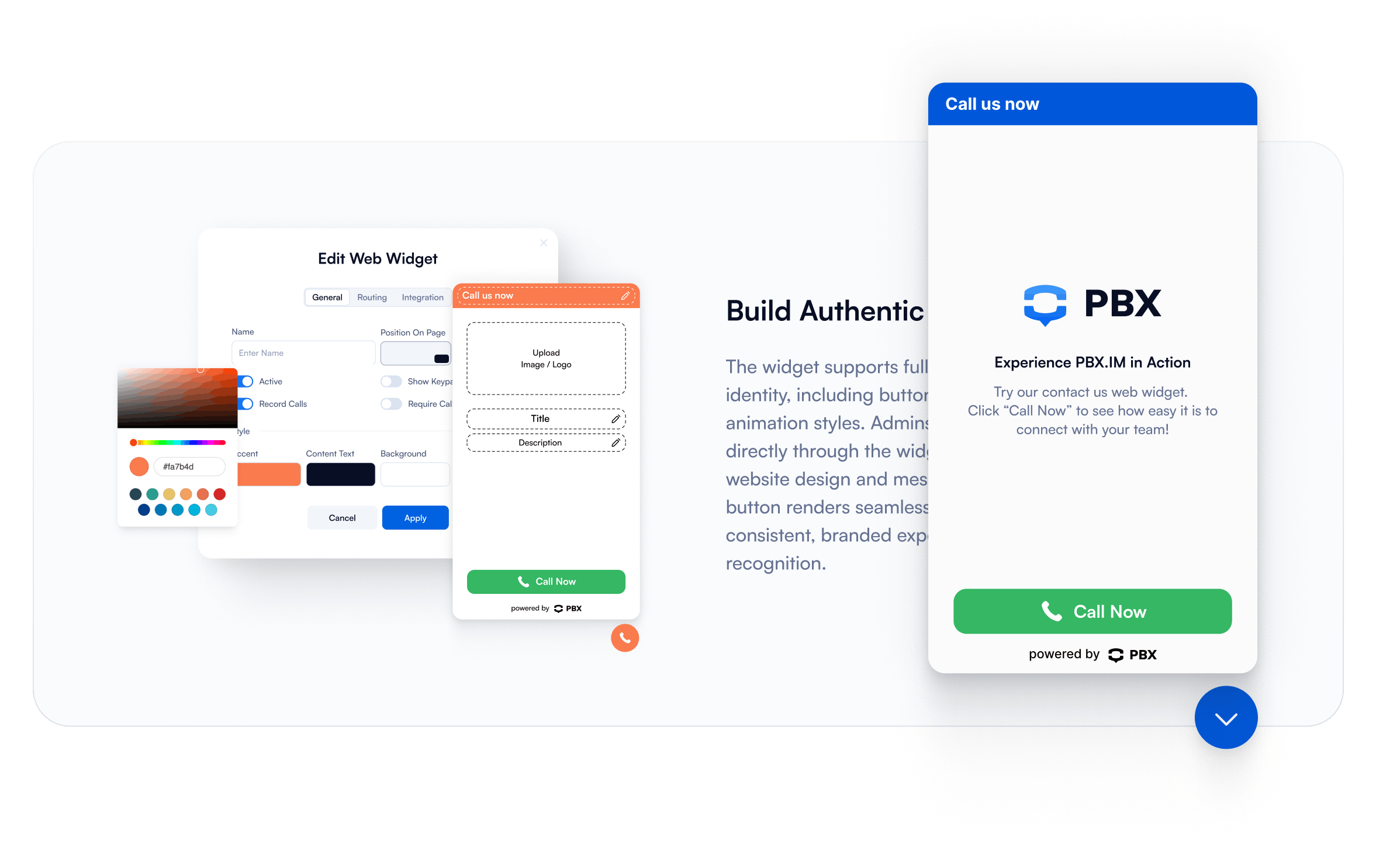
The Contact Us Web Widget revolutionizes how customers connect with your business by embedding a calling interface directly into your website. Visitors see a clean, professional widget that allows them to initiate calls to your business with a single click—no app downloads, no phone number hunting, no complicated processes. They simply click the widget, the connection establishes through their browser, and they're speaking with your team within seconds.

From your customers' perspective, this eliminates the friction that often prevents people from calling businesses. They don't need to switch devices, search for contact information, or worry about long-distance charges. The barrier to communication drops to essentially zero, which directly translates to more conversations, more sales opportunities, and better customer satisfaction.
Your business benefits extend far beyond convenience. The Web Widget integrates with your call routing rules, ensuring customers reach the right department or team member based on the page they're viewing or the time they're calling. Someone browsing your pricing page might get routed to sales, while someone on the support documentation page connects with technical support. This intelligent routing improves first-call resolution rates and creates more efficient customer experiences.
Analytics from Web Widget calls provide unique insights into customer behavior. You'll see which pages drive the most call requests, what times customers prefer to connect, and how website traffic correlates with call volume. This data helps you optimize staffing levels, improve website content, and understand which marketing efforts drive genuine customer engagement rather than just pageviews.
The professional impression matters more than many businesses realize. When customers can call directly from your website through a polished, modern interface, you signal that you're a technology-forward company that values customer convenience. This small touch point significantly impacts brand perception, particularly when competing against businesses that only list a phone number and hope customers will dial manually.
How to Find the Right Platform to Make Calls from a Computer
Connection type fundamentally shapes your calling experience and capabilities. Internet-based VoIP systems like PBX.IM route calls entirely through your internet connection, providing flexibility and advanced features that app-linked mobile solutions can't match. Mobile-linked options (where your computer connects through your smartphone) limit you to your mobile carrier's capabilities and often lack business features like call recording, analytics, or CRM integration. For professional use, pure VoIP platforms deliver superior quality and functionality.
Cost and call rates require careful analysis beyond the advertised price. Free plans often restrict call minutes, limit features, or add per-minute charges that quickly exceed paid plan costs when you're making regular business calls. International calling fees vary dramatically between providers—some charge $0.01-$0.05 per minute to major countries, while others impose $0.20-$0.50 rates that make global communication prohibitively expensive. Calculate your actual usage patterns (domestic vs. international, average monthly minutes) to determine true monthly costs.
Ease of use directly impacts adoption rates across your team. The best technology fails if employees find it confusing or cumbersome. Look for platforms that work in standard web browsers without plugins, offer intuitive interfaces that require minimal training, and provide compatibility across Windows, Mac, and Linux systems. If your team needs dedicated apps, verify they're available for all operating systems your company uses. Request demo accounts to test workflows before committing.
Call quality and reliability make or break business communications. Poor audio quality frustrates customers, damages your professional reputation, and forces costly repeat calls. Evaluate platforms based on their codec support (Opus and G.722 provide superior quality), redundancy infrastructure (multiple data centers prevent outages), and Quality of Service (QoS) features that prioritize voice traffic. Read reviews from businesses in similar industries and test call quality during your trial period across various network conditions.
Privacy and data security cannot be afterthoughts when you're handling customer communications. Verify that platforms provide end-to-end encryption for calls, maintain compliance certifications relevant to your industry (HIPAA for healthcare, PCI DSS for payment processing), and offer granular permission controls so employees only access data appropriate for their roles. Review data residency policies if you operate internationally, and confirm the provider's approach to data retention and deletion aligns with your compliance requirements.
When Does It Make Sense to Call From a Web Browser
Supporting global clients or partners becomes dramatically more affordable and manageable through browser-based calling. Traditional international calling cards or mobile carrier rates charge $0.20-$2.00 per minute for international calls, while VoIP platforms typically cost $0.01-$0.05 per minute to the same destinations. When your business regularly communicates with overseas customers, partners, or remote team members, this cost difference saves thousands to tens of thousands annually while providing better call quality than traditional international lines.
Integrating communication with CRM or helpdesk tools transforms how your team works with customers. Browser-based calling enables Click2Call functionality directly within Salesforce, HubSpot, Zendesk, or Freshdesk—your sales reps and support agents click phone numbers in customer records to instantly initiate calls while maintaining context. Call logs, recordings, and notes automatically sync back to customer records, eliminating manual data entry that consumes 10-15% of employee time in businesses using disconnected systems.
Running customer support or inside sales operations demands features that consumer calling apps simply don't provide. Support teams need call queuing during busy periods, skills-based routing to connect customers with specialists, call monitoring for quality assurance, and historical analytics to optimize staffing. Inside sales teams require local presence calling (displaying local caller ID regardless of where reps are located), call recording for training and compliance, and power dialer capabilities for efficient outreach campaigns. Browser-based business platforms deliver these essential features that directly impact team performance.
Improving call tracking and analytics provides visibility that transforms communication from a cost center into a strategic asset. When calls route through your computer via a business platform, you can track which marketing campaigns drive calls, calculate cost-per-call acquisition, measure average handle time, monitor first-call resolution rates, and identify trends in customer inquiries. This data-driven approach helps you allocate marketing budgets more effectively, optimize team performance, and justify communication infrastructure investments with clear ROI metrics.
Needing advanced features like analytics, AI transcriptions, and SMS marks the inflection point where browser-based business platforms become essential rather than optional. As your company grows, basic calling functionality isn't enough—you need automated transcriptions that capture every customer conversation for training and compliance, sentiment analysis that identifies at-risk customers, SMS capabilities for asynchronous communication, and comprehensive reporting that provides leadership visibility into communication performance. These advanced features only exist in dedicated business platforms, making computer calling the natural choice for growing companies.
Computer Phone Calls FAQs
Do you need a phone call app for PC?
No, you don't need to download or install a dedicated phone call app for PC when using modern browser-based platforms like PBX.IM. The entire system operates through your web browser (Chrome, Firefox, Safari, or Edge), eliminating installation requirements, compatibility concerns, and update management. Simply log into the web dashboard and start making calls immediately. However, PBX.IM does offer optional desktop and mobile apps if you prefer a dedicated application experience with additional features like system tray integration and desktop notifications.
Can I make international calls from my computer?
Yes, you can make international calls from your computer using VoIP platforms like PBX.IM, often at a fraction of traditional international calling costs. While standard mobile carrier international rates range from $0.20-$2.00 per minute, computer-based VoIP calling typically costs $0.01-$0.05 per minute to major countries. The platform displays international calling rates transparently, and you can add international calling credits or subscribe to unlimited international calling plans depending on your usage volume. Call quality to international destinations often exceeds traditional phone lines because VoIP routes calls through optimized internet pathways rather than aging international trunk lines.
How much does it cost to make calls from my computer using PBX.IM?
PBX.IM offers flexible pricing starting with a free plan that includes basic calling features, making it accessible for solopreneurs and small teams to test the platform. Paid plans begin at $5 per user per month, providing professional features like call recording, advanced analytics, and CRM integrations. International calling costs vary by destination—typically $0.01-$0.05 per minute for major countries—with the option to purchase calling credits or unlimited international plans. Unlike traditional phone systems requiring thousands in upfront hardware investment, PBX.IM operates on a subscription model with no capital expenses, no maintenance contracts, and the flexibility to scale up or down based on your team size.
Can I call free from a computer using PBX.IM?
Yes, PBX.IM offers a free plan that allows you to make calls from your computer without monthly subscription fees. The free plan includes core calling features and provides an excellent way to test whether computer-based calling fits your workflow before upgrading to paid plans. However, while the platform subscription can be free, you'll still need calling credits for outbound calls to phone numbers—these credits are charged based on your destination and call duration. Internal calls between PBX.IM users within your organization are completely free regardless of plan level, making it cost-effective for team collaboration.
What are some other apps to make calls from a computer?
Several platforms enable computer calling, each serving different use cases. Google Voice provides free calling within the US and affordable international rates, but lacks advanced business features and doesn't scale well for teams. Skype offers international calling and screen sharing but focuses more on consumer use rather than business communication needs. Microsoft Teams integrates calling with collaboration tools for enterprises already using Microsoft 365, though it requires more complex setup. Zoom Phone combines video conferencing with phone service, ideal for businesses heavily invested in Zoom's ecosystem. RingCentral and 8x8 provide comprehensive unified communications but at higher price points than PBX.IM. The right choice depends on your specific requirements—team size, feature needs, existing software ecosystem, and budget constraints.
Can I call landlines from a computer?
Absolutely—computer-based calling platforms like PBX.IM fully support calling landline numbers domestically and internationally. There's no technical difference in how the system handles calls to landlines versus mobile phones; you simply dial the number and the VoIP platform routes the call through the traditional phone network. In fact, many businesses prefer using computer calling for landline calls specifically because it eliminates the need to maintain desk phones while still reaching customers and partners who use traditional landline service. Call quality to landlines typically matches or exceeds traditional phone-to-phone calls because modern VoIP codecs provide clearer audio than aging copper telephone infrastructure.

David Pop is a copywriter and marketing strategist specializing in VoIP and business communication solutions. At PBX.IM, he leverages his expertise in cloud telephony and modern communication technologies to craft clear, insightful content that helps business leaders and IT professionals understand and optimize their systems. With extensive experience in marketing and content development, David brings precision and clarity to complex topics, ensuring businesses can make informed decisions about their communication infrastructure.